See who tried to get into your phone
When someone enters a wrong PIN, password or pattern on your lock screen, Phone Guard takes a photo with the front camera and logs the time. Once you have a vault, the photo is sealed so only your unlocked vault can show it.
When does Phone Guard take a photo?
Every time someone enters a wrong code on your lock screen, and every time the phone is unlocked. Both are on by default, and each has its own switch in Guard settings.
Photo on failed unlock
A wrong PIN, password or pattern on the lock screen. Android tells Guard, and Guard takes a front-camera photo.
Photo on unlock
A photo each time the phone is unlocked correctly, so you can see who got in. Turn it off if you only want failed tries.
Where do the photos go?
Into your vault, sealed. Each photo is encrypted the moment it is taken, so only your unlocked vault can open it.
Step 1: A wrong code
Someone types the wrong PIN, password or pattern on your lock screen.
Step 2: A front-camera photo
Guard takes the photo in memory, with no preview on the screen.
Step 3: Sealed for your vault
It is encrypted with your vault's public key before anything is written to storage.
Step 4: Opened only in the vault
At your next vault unlock it is filed under Guard photos, dated when it was taken.
Guard can lock photos away, but never open them
- Guard and Home never show the photo. They show a lock tile that opens the vault.
- Share or delete a photo from inside the vault, like any other file.
- No vault yet? Photos wait in the app's private storage and are sealed into the vault once you create one.

What does the log show?
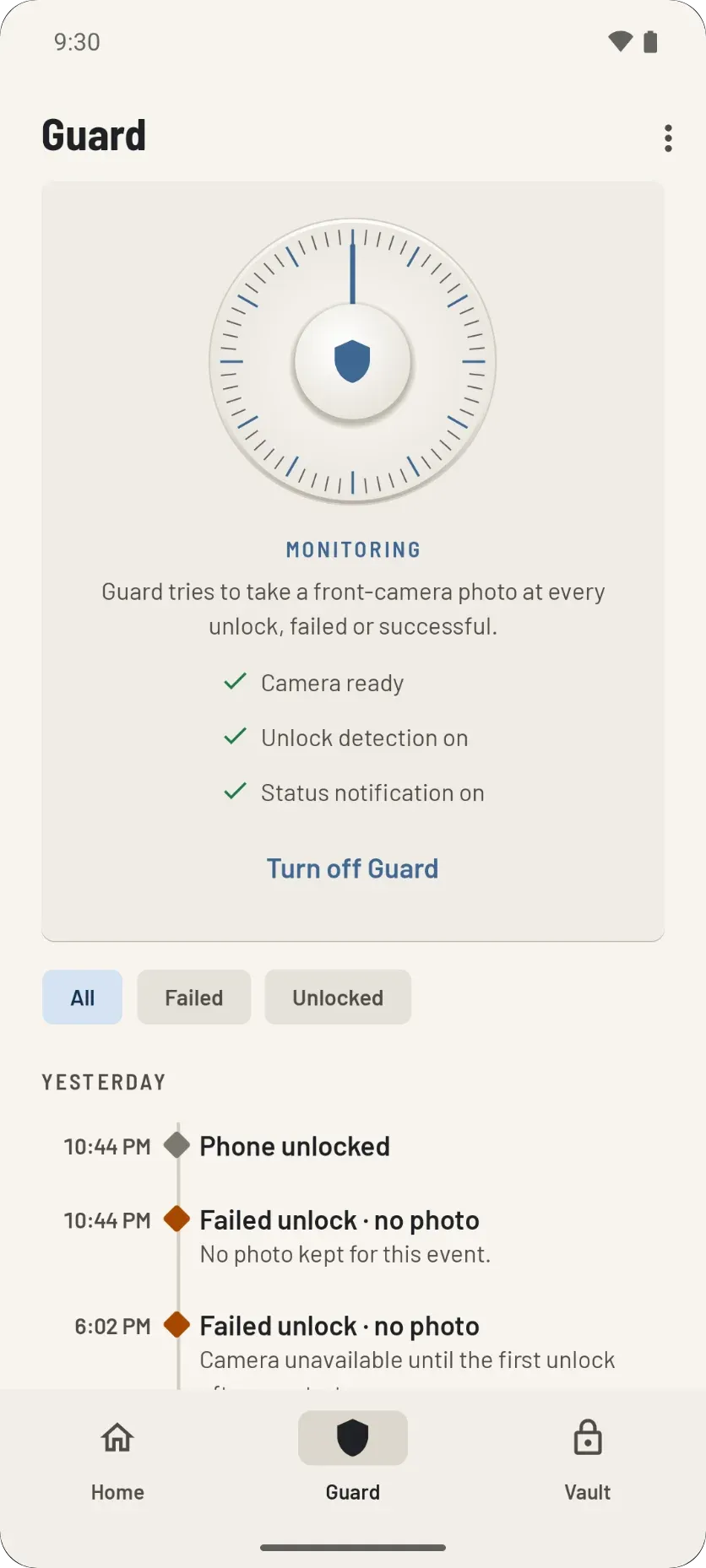
A day-by-day list of failed and successful unlocks, with the time of each and whether a photo was taken.
Day by day
Every failed and successful unlock, with its time and whether a photo was kept. Filter by failed or unlocked.
The last 30 days
The log keeps the last 30 days or 500 events, whichever comes first.
Photos are never pruned
Clearing old rows never deletes a sealed photo. It still moves into the vault at the next unlock.
Room for 1,000 waiting photos
If that fills up, unlock photos go first and photos of failed tries go last.
Can it show what they opened?
Yes, if you turn it on. Guard can note which apps were opened after a wrong code, and for how long. Never what was inside them.
- It starts when the phone is unlocked within two minutes of a wrong code, and stops when the screen turns off, or after 30 minutes.
- The report is sealed for your vault and can only be read inside it.
- If someone reaches a vault screen in that time, Stillgarth also seals a picture of its own screen. Never another app's.
- It needs Usage access, which you grant by hand in Android settings. Until you do, it does nothing. The setting is called Record what an intruder opens.
Why is there always a notification?
So you always know Guard is on. Guard runs as a visible service, which is also what lets it use the camera the moment a wrong code is entered.
- Turn Guard off any time from the Guard screen.
- For Guard to keep running, let it skip Android's battery optimization. Guard takes you to the right battery screen; it asks for no special permission.
- After a restart or an app update, Guard shows a "Tap to re-arm" notification. One tap starts it again.
Why does Guard need device administrator?
Because it is the only way Android tells an app that a wrong unlock code was entered. Guard uses it for that alone.
- It cannot lock, wipe or change your phone.
- In Android it is listed as Stillgarth Guard unlock detection.
- You can turn it off in Android settings, or by turning Guard off.
Can someone just turn Guard off?
Not quietly from inside the app. Once you have a vault, turning Guard off, deleting an event or opening Guard settings asks for your vault password, PIN or fingerprint.
- This is the "Is it you?" check. The vault stays locked while it checks, with the same wrong-guess delays as the unlock screen.
- It is on by default. The setting is called Ask for the vault to change Guard.
- Looking at the log is never locked.
- A duress code typed here lets the change through and erases the vault.
Is it OK to photograph whoever picks up my phone?
Phone Guard is meant for your own phone.
Know who picked up your phone
Phone Guard and the vault come together in one app, with no internet permission and no account.